







Chrome Proxy Integration
Integrating Chrome with Bright Data proxies allows for secure and efficient web scraping, providing flexible proxy management to enhance data extraction and browsing performance.
This guide may be outdated. For an up-to-date guide please see our documentation.

- 400M+ Residential IPs
- Sticky and rotating sessions
- 99.95% success rate
- Geo-location targeting - FREE

Using Proxies with Chrome
In the modern digital landscape, ensuring a safe, efficient, and unrestricted browsing experience has never been more crucial. This article explains the benefits and process of integrating the world’s number one proxy service, Bright Data proxies, with your Google Chrome browser.
Configuring Proxy Settings in Chrome
Follow these steps to fortify your Chrome browser with proxy protection:

Open Chrome:
Once you open Chrome, click on the menu (three vertical dots) in the top right corner. Choose ‘Settings’.

Select 'System' from the left menu.
Click on “Wi-Fi” in the sidebar, then click the “Details” button beside your connected network.
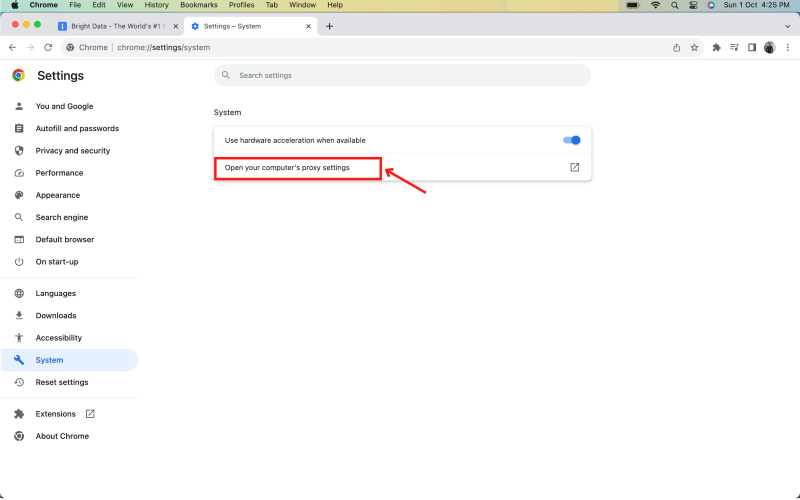
Click on 'Open your computer’s proxy settings'.
Navigate to the “Proxies” tab and select a protocol to configure.
Chrome proxy configuration
⚠️Important note: If you are using Bright Data’s Residential Proxies, Web Unlocker or SERP API, you need to install an SSL certificate to enable end-to-end secure connections to your target website(s). This is a simple process, see https://docs.brightdata.com/general/account/ssl-certificate#installation-of-the-ssl-certificate for instructions.
Get proxies for Chrome

Impulsionado por uma infraestrutura de proxy residencial premiada
Mais de 400M+ monthly de proxies residenciais, a melhor tecnologia da categoria e a capacidade de segmentar qualquer país, cidade, operadora e ASN, torna nossos serviços de proxy premium a melhor escolha para desenvolvedores.


Um proxy para cada caminho de desenvolvimento
Combine redes, peers e IPs para otimizar seu fluxo contínuo de dados da web.


Proxy Network Pricing


- Escala ilimitada
- Assentos ilimitados
- SLA Premium
- 99,99% de disponibilidade de rede
- Gestor de Proxy Gratuito
- Cobertura completa de dados
- Preço personalizado por GB
- Soluções personalizadas
- Escala ilimitada
- Assentos ilimitados
- SLA Premium
- 99,99% de disponibilidade de rede
- Gestor de Proxy Gratuito
- Cobertura completa de dados
- Preço personalizado por GB
- Soluções personalizadas
- Escala ilimitada
- Assentos ilimitados
- SLA Premium
- 99,99% de disponibilidade de rede
- Gestor de Proxy Gratuito
- Cobertura completa de dados
- Preço personalizado por GB
- Soluções personalizadas
- Escala ilimitada
- Assentos ilimitados
- SLA Premium
- 99,99% de disponibilidade de rede
- Gestor de Proxy Gratuito
- Cobertura completa de dados
- Preço personalizado por GB
- Soluções personalizadas

Líder em proxies e coleta de dados


